Getting started with the Google Analytics property


Channel: Google Analytics
Uploaded by Google Analytics on 20201014
Categories: Education
Tags: Google, GA, Google Analytics, measure, 2020
In this video, Krista Seiden will take you through an overview of the Google Analytics property. Open Google Analytics: https://analytics.google.com Meet Google Analytics 4: https://support.google.com/analytics/answer/10089681

Here is a detailed breakdown of the video content based on the official product walkthrough from the Google Analytics team, titled "Getting started with the Google Analytics 4 property". The title is in English, so the summary is provided entirely in English.

1. Introduction to the Next Generation of Analytics

Host Krista Seiden introduces the foundational structural shift behind Google Analytics 4 (GA4). Designed to meet changing technological frameworks, data privacy rules, and the elimination of third-party cookies, this property is built from the ground up to offer scalable, intelligent cross-platform insights across websites and mobile applications simultaneously.

2. The Paradigm Shift: From Sessions to Events

The video breaks down the most critical structural change from older versions of Universal Analytics: the move to an event-based data model. Instead of measuring tracking via pageviews and isolated 30-minute sessions, GA4 processes every user interaction as a unique event, capturing a richer, more accurate view of continuous user behavior.

OLD VS. NEW MEASUREMENT MODEL

Universal Analytics: [ Pageview ] ===> [ Session Window ] =
Image for chunk 1

==> [ Hit Type ]

Google Analytics 4: [ Event ] ===> [ Parameter 1 ] ===> [ Parameter 2 ]

3. Exploring the Core Categories of Events

The host categorizes how events are generated and collected within the ecosystem. Rather than requiring complex code injections for basic tracking, events are divided into automated frameworks designed to streamline the implementation phase for web developers and businesses:

Automatically Collected Events: Native triggers captured by standard base code execution.

Enhanced Measurement: Out-of-the-box tracking for scrolls, outbound link clicks, site searches, and video engagement.

4. Harnessing Built-In Predictive Machine Learning

A major feature highlight is the integration of advanced machine learning capabilities. GA4 leverages Google's predictive models to automatically generate smart alerts, surface underlying behavioral anomalies, and forecast future customer actions, such as purchase probabilities and sudden churn risks without manual configuration.

+-----------------------------------+-----------------------------------+

| Feature Framework | Business Application |

+-

Image for chunk 2

----------------------------------+-----------------------------------+

| Purchase Probability forecasting | Target high-value audiences |

| Automated Churn Prediction | Implement retention campaigns |

| Structural Anomaly Detection | Uncover bugs or sudden traffic drops|

+-----------------------------------+-----------------------------------+

5. Rethinking Core Metrics: Engagement Over Rebound

The walkthrough explains changes to legacy data metrics. The traditional "Bounce Rate" is replaced by a far more useful indicator: the Engagement Rate. This metric tracks the exact percentage of sessions that actively lasted longer than 10 seconds, recorded a conversion event, or triggered multiple page views.

THE ENGAGEMENT RATE TRIGGER

[ User Session Starts ]

|

+---> Active for > 10 Seconds? -------> [ YES ] ===> Counted as Engaged

+---> Triggered a Conversion? --------> [ YES ] ===> Counted as Engaged

+---> Viewed 2+ Pages/Screens? -------> [ YES ] ===> Counted as Engaged

6. The Advanced "Explorations" Toolset

The video transitions to the analytical interface, showcasing the "Explore" t

Image for chunk 3

ab. This section provides advanced reporting templates that go far beyond standard dashboard layouts, allowing power users to conduct detailed funnel analyses, path explorations, and cohort reviews that previously required external database tools.

7. Cross-Platform Stream Integration

The host demonstrates how GA4 solves data fragmentation by unifying distinct web and application streams into a single reporting property. By linking unique user IDs across desktop environments, Android, and iOS devices, businesses can map a customer's entire lifetime journey smoothly without double-counting users.

8. Implementation Steps and Initial Setup Guidance

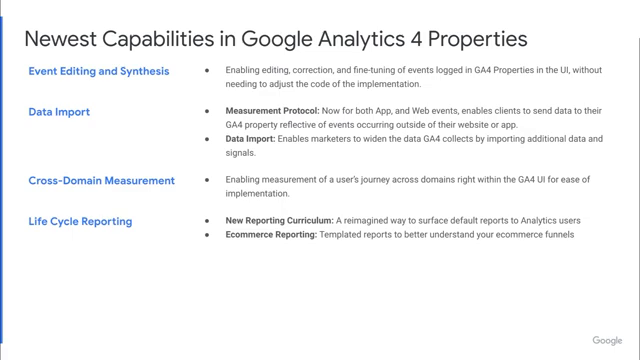
The segment concludes with practical configuration guidance for properties upgrading from legacy tracking setups. The host shows how to locate the tracking tag, toggle Enhanced Measurement streams on, and begin running dual-tagging environments to safely collect data while transitioning fully to the modern platform.

You can watch the full interface walkthrough directly on the official Google Analytics Property Getting Started Video, which features complete screen-share demonstrations by Krista Seide

Image for chunk 4

Viewer Discussion & Comments

@chihweiliu1680
How to Data import in the current version? I tried to upload my excel data, but it always displays failure. Can any Google Analytics help on this issue?
@kennethchun6348
Can i ask the question :
@alicjanowak1501
Every day on the dashboard i see a different number of users, even when I set the dates to the same pariod as thhe previous time. Npot long ago I had 40 users within a period of time, now it says 8. Users from Argentina and the US have disappeared from the report.
@anthonyroebuck970
I don't understand most of that... i just want to continue using the features I'm familiar with in GA3
@hafsaataahir
Does one have to know GA to study GA4? Or can one learn GA4 directly?