I Tested Apple’s Secret macOS AI… The Results Made No Sense


Channel: Alex Ziskind
Uploaded by Alex Ziskind on 20260710
Categories: Science & Technology
Tags: software developer, programmer, software development, programming, developer, developer tests, m3 chip, machine learning, llm, m3max, m3 llm, m3 ml, m3 max ml, ml on m3, machine learning m3, m3 machine learning, m3 ai, webui, openui, open webui, local ai, local chatgpt, llama.cpp, nuc, m4 pro, mac mini, apple, apple mini, mini, m4 mini, m4 pro mac mini, m4 max, mac studio, m3 ultra, m4 max mac studio, mac cluster, macbook, macbook pro, m5 macbook, m5max, m5 max, m5 max macbook
Apple quietly hid a local AI model inside macOS 27, so I benchmarked it to see whether a $10,000 Mac Studio could actually make it run faster. ✅ Try SuperNori here: https://heynori.go.link/aTNsi 🛒 Gear Links 🛒 💻☕ Thunderbolt 5 external SSD: https://amzn.to/3XqetZO 💻☕ Favorite 15" display with magnet: https://amzn.to/3zD1DhQ 🎧⚡ Gre

Here is a detailed breakdown of the video titled "I Tested Apple’s Secret macOS AI… The Results Made No Sense" by Alex Ziskind:

Overview

The video explores a hidden, built-in Large Language Model (LLM) command-line interface (CLI) tool called FM that quietly ships with macOS (specifically tested on macOS beta version 27). The creator investigates how fast this built-in AI tool runs, compares performance across different Apple Silicon hardware (an M4 Pro Mac Mini ver

Image for chunk 1

sus an M3 Ultra Mac Studio), and solves a performance mystery regarding which hardware components actually handle the workload.

Key Sections & Details

1. Introduction to the Hidden macOS AI (FM)

What it is: macOS includes a built-in CLI tool called fm that lets users run large language models directly inside the terminal without installing third-party runners like Ollama, LM Studio, or MLX [01:48].

Cloud vs. Local: The tool features two distinct modes: a local on-de

Image for chunk 2

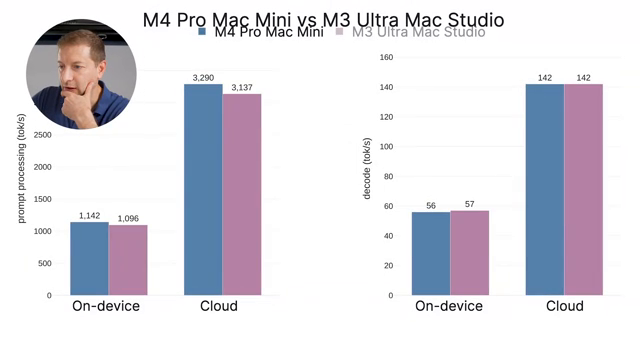
vice mode and an Apple cloud-based mode via "Private Cloud Compute" [04:05]. The cloud version runs roughly three times faster than the local model [04:30].

Sponsor Interlude: The video briefly highlights Super Nori, a proactive family AI agent designed to run in the background and anticipate daily scheduling or family coordination issues [00:25].

2. The Benchmarking Challenge

Standard third-party benchmarking tools (like Llama Bencher) failed to read Apple's endpoi

Image for chunk 3

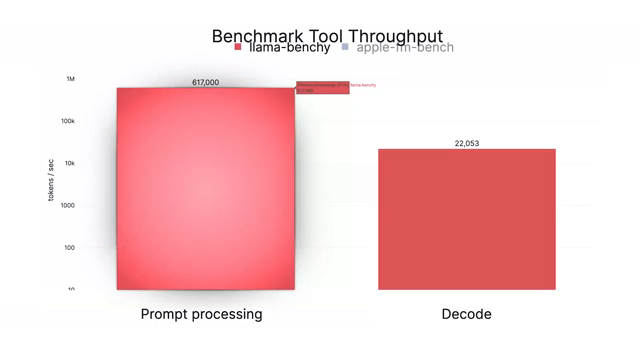
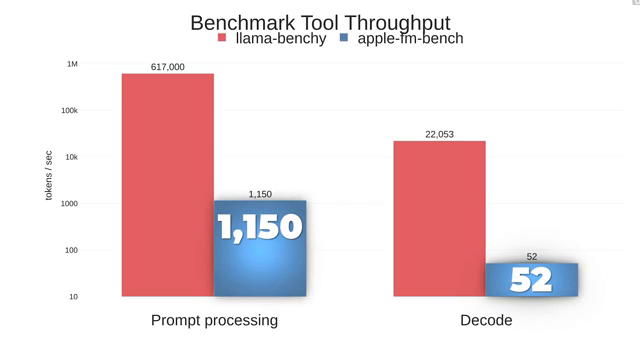
nt correctly because Apple's server does not fully comply with standard OpenAI API timing outputs, returning erroneous results like 600,000 tokens per second [02:54].

To resolve this, the creator built a custom benchmark tool called Apple FM bench to measure real on-device metrics [03:41].

3. Hardware Comparison: Mac Mini vs. Mac Studio

The Contenders:

Mac Mini (M4 Pro): 273 GB/s memory bandwidth [04:52].

Mac Studio (M3 Ultra): 819 GB/s memory bandwidth and a much m

Image for chunk 4

ore powerful GPU [05:25].

The Mystery: Despite the Mac Studio being vastly more expensive and boasting significantly higher memory bandwidth, running the local FM model yielded nearly identical benchmark results on both machines [05:50].

4. Investigating the Bottleneck & Hardware Usage

Meter Inaccuracies: Standard monitoring utilities like Mactop and Azytop (which rely on Apple's powermetrics under the hood) incorrectly reported 0% utilization on the Apple Neural En

Image for chunk 5

gine (ANE) during tests [07:05].

Stress-Testing Strategy: Since meter software could not be trusted, the creator designed an experiment forcing the engines to compete:

Hammering the Neural Engine caused the decode stage of FM to slow down [09:08].

Hammering the GPU caused the prompt processing (prefill) stage of FM to slow down [09:12].

Conclusion:

Prompt processing runs on the GPU [09:27].

Token generation (decode) runs on the Neural Engine [09:26].

Summary Diagram

Image for chunk 6

of Hardware Utilization

Plaintext

+-------------------------------------------------------------+

| macOS FM AI Tool |

+------------------------------+------------------------------+

|

+-----------------------+-----------------------+

| |

v v

+-----------------------------+

Image for chunk 7

+-----------------------------+

| Prompt Processing Stage | | Token Generation Stage |

| (Prefill) | | (Decode) |

+-----------------------------+ +-----------------------------+

| |

v v

+-----------------------------+ +--------------------------

Image for chunk 8

---+

| Runs on GPU | | Runs on Neural Engine |

+-----------------------------+ +-----------------------------+

| |

v (Scales with hardware) v (Identical across M2-M5)

+-----------------------------+ +-----------------------------+

| Benefited by Mac Studio's | | Limited by 16-core Neural |

| mass

Image for chunk 9

ive memory bandwidth | | Engine present in both Mini |

+-----------------------------+ +-----------------------------+

Final Takeaways

Purchasing Advice: Because the decode stage relies heavily on the Neural Engine—which features a standard 16-core layout across Apple Silicon chips—a base Mac Mini delivers essentially the exact same performance running Apple's built-in AI tool as a maxed-out, much more expensive Mac Studio [09:32].

Image for chunk 10

Alternative Frameworks: Unlike Apple's built-in tool, frameworks that rely entirely on large local models (such as MLX or Llama.cpp) actively scale with the massive GPU and high memory bandwidth of higher-end hardware like the Mac Studio [10:09].

Beta Status: The implementation is subject to change by Apple since the feature remains in beta [10:43].

http://www.youtube.com/watch?v=8vDuIVlfeV0

I Tested Apple’s Secret macOS AI… The Results Made No Sense

Alex Ziskind ·

Image for chunk 11

Viewer Discussion & Comments

@DS-pk4eh
The only thing I am getting with FM is Pop&Rock radio hits. Is that normal?
@JayJahng
those mac studios are no longer “just” 10 grands….and that makes me sad
@PaulGreeve
Alex you are missing oMLX for running local models leveraging Apple’s MLX core and oMLX has just hit version 0.5.0 with some huge speed and efficiency improvements for running models like Qwen3.6 27B and 35B A3B. It has an advanced quantizer built in and that has also been improved with this new version. I am successfully running the Qwen 27B and 35B A3B models quantized to oQ4 and oQ3.5 respectively on my Mac mini Pro M4 (24GB) by using the cli ‘sudo sysctl -w iogpu.wired_limit_mb=22528’ and turning off oMLX memory Memory Guard (I have since added a startup command to set the GPU memory on startup). I think you will be pleasantly surprised at how well the Mac performs when oMLX is used to run local inference.
@JohnCremboz
4:48 flash bang warning, some madman seems to use terminal in light mode...
@canvasbagfight
I like your experimental approach. Very much like what we do in biology.